07_Face Detection with OpenCV YuNet
This project demonstrates real-time face detection using YuNet, a high-performance deep learning model from the OpenCV Model Zoo.
Overview
YuNet is a convolutional neural network (CNN) specifically designed for face detection. It is extremely fast and capable of detecting faces even with small sizes or side views.
Key technical highlights:
- Model format: ONNX (Open Neural Network Exchange).
- Framework: OpenCV’s
dnnmodule. - Features: Detects face bounding boxes and 5 facial landmarks (eyes, nose, mouth corners).
Implementation Details
The implementation uses the cv2.FaceDetectorYN class provided by OpenCV.
1. Model Initialization
The detector is initialized with specific parameters to balance speed and accuracy.
import cv2

# Configuration
model_path = "face_detection_yunet_2023mar.onnx"
input_size = (width, height) # Size of the input image
score_threshold = 0.9
nms_threshold = 0.3
top_k = 5000

# Create the detector
detector = cv2.FaceDetectorYN.create(
    model_path,
    "",
    input_size,
    score_threshold,
    nms_threshold,
    top_k
)
2. Face Detection
Running the detection process is a simple method call.
# Detect faces
_, faces = detector.detect(image)

if faces is not None:
    for face in faces:
        # face contains [x, y, w, h, x1, y1, x2, y2, x3, y3, x4, y4, x5, y5, score]
        bbox = face[0:4].astype(int)
        landmarks = face[4:14].reshape((5, 2)).astype(int)
        score = face[14]
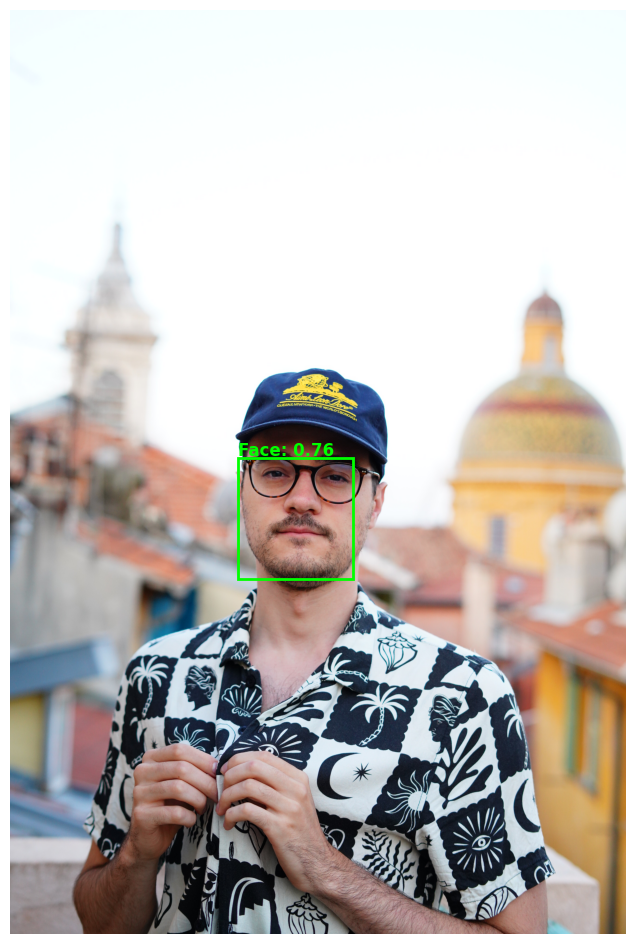
Example Output
Below is an example of the model detecting a face in a high-resolution image.
Conclusion
YuNet provides a modern, robust alternative to traditional Haar Cascades or HOG-based detectors, making it ideal for edge devices and real-time applications.
TODO
- Implement video stream detection
- Add face recognition layer
Last Updated: 2026-01-27