Disposable Camera Effect: Under the Hood
The objective of this project was to create a digital processing pipeline that mimics the nostalgic, low-fidelity look of a disposable camera. Using OpenCV and NumPy, we simulate the limitations of cheap plastic lenses and chemical film processing.
The Processing Pipeline
The transformation is applied in a specific order to layer the effects naturally:
1. Auto-Orientation & Aspect Ratio
Goal: Mimic the standard 4x6 print ratio. The code detects the orientation of the input image and crops it to a clean 4x6 (or 6x4) aspect ratio.
def apply_aspect_ratio(image, target_ratio=(4, 6)):
    h, w = image.shape[:2]
    current_ratio = w / h
    target_w, target_h = target_ratio
    desired_ratio = target_w / target_h

    if current_ratio > desired_ratio:
        new_w = int(h * desired_ratio)
        start_x = (w - new_w) // 2
        return image[:, start_x:start_x+new_w]
    else:
        new_h = int(w / desired_ratio)
        start_y = (h - new_h) // 2
        return image[start_y:start_y+new_h, :]
2. Vintage Tone Curve (Fading)
Goal: Simulate the washout look of aged film. By lifting the black point (shadows) and flattening the white point (highlights), we reduce the dynamic range.
def apply_vintage_curves(image, lift_shadows=30, flatten_highlights=230):
    lut = np.arange(256, dtype=np.uint8)
    min_v, max_v = lift_shadows, flatten_highlights
    distance = max_v - min_v

    lut = (lut / 255.0) * distance + min_v
    lut = np.clip(lut, 0, 255).astype(np.uint8)
    return cv2.LUT(image, lut)
3. Color Grading
Goal: Replicate the warm/green color cast. We adjust the RGB channels to create that characteristic “consumer film” tint.
def apply_color_balance(image, red_mult=1.2, green_mult=1.05, blue_mult=0.85):
    b, g, r = cv2.split(image)
    b = np.clip(b * blue_mult, 0, 255).astype(np.uint8)
    g = np.clip(g * green_mult, 0, 255).astype(np.uint8)
    r = np.clip(r * red_mult, 0, 255).astype(np.uint8)
    return cv2.merge((b, g, r))
4. Contrast & Softness
Goal: Mimic plastic lenses. A slight Gaussian blur removes digital sharpness, while a contrast boost keeps the image from feeling too “muddy.”
def apply_softness(image, radius=1.0):
    return cv2.GaussianBlur(image, (0, 0), radius)

def apply_contrast(image, alpha=1.2):
    return cv2.convertScaleAbs(image, alpha=alpha, beta=0)
5. Film Grain
Goal: Simulate ISO 400 texture. Gaussian noise is added to the image to replicate the “grit” of high-speed film stocks.
def add_grain(image, intensity=0.2):
    h, w, c = image.shape
    noise = np.random.normal(0, intensity * 50, (h, w, c)).astype(np.float32)
    noisy_image = image.astype(np.float32) + noise
    return np.clip(noisy_image, 0, 255).astype(np.uint8)
6. Vignetting
Goal: Simulate lens fall-off. A radial mask darkens the corners, drawing focus to the center just like a fixed-aperture plastic lens.
def apply_vignette(image, strength=0.5, radius_scale=0.8):
    h, w = image.shape[:2]
    X_kernel = cv2.getGaussianKernel(w, w * radius_scale)
    Y_kernel = cv2.getGaussianKernel(h, h * radius_scale)
    kernel = Y_kernel * X_kernel.T
    mask = kernel / kernel.max()
    vignette_mask = cv2.merge([mask * strength + (1 - strength)] * 3)
    return np.clip(image.astype(np.float32) * vignette_mask, 0, 255).astype(np.uint8)
Example Output
Below is an example of the transformation applied to a raw digital photo using the pipeline described above:
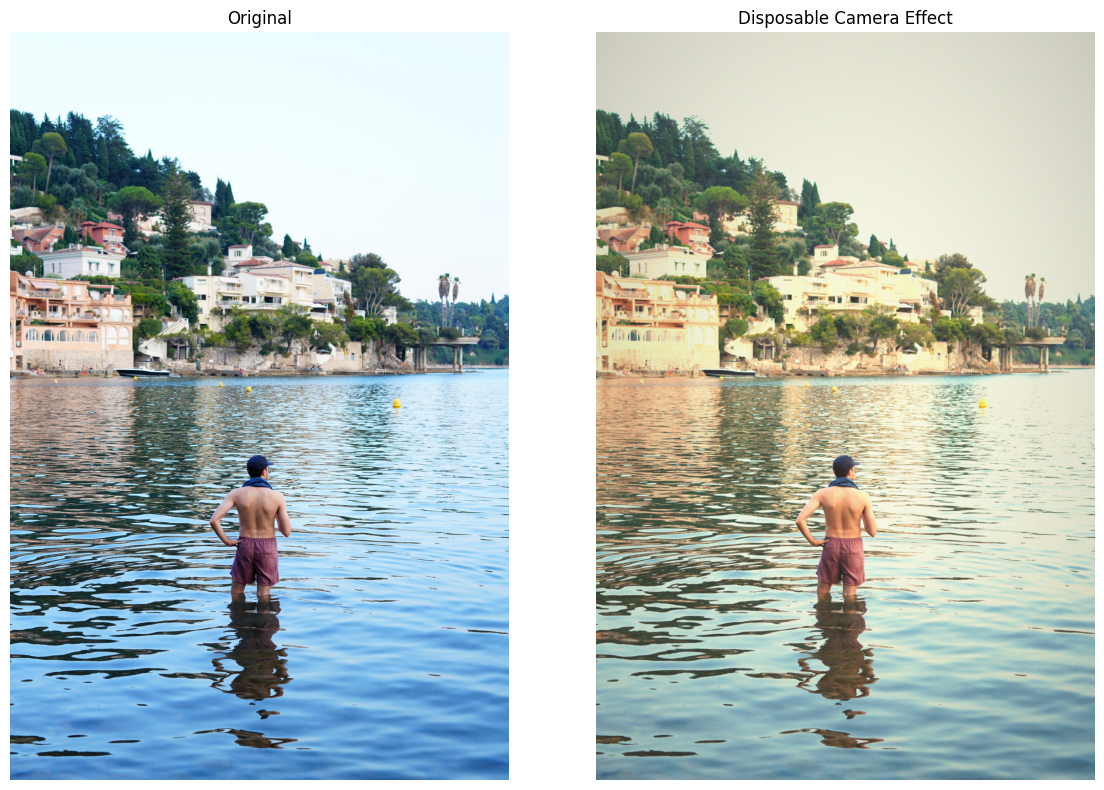
Note: The results vary based on the input image’s base lighting and color profile.
Technical Summary
By combining these modular functions into a single pipeline, we can transform any sharp modern photo into a nostalgic “disposable” memory. The entire process relies on native operations in cv2 and numpy, making it extremely fast and lightweight.
TODO
- Add more example photos
- Fine-tune grain parameters
Last Updated: 2026-01-27